.svg)
The Pricing Engine enables new product and channel visionsthrough complex and flexible pricing.
Through advanced parameterization, data can be collected,calculated, and new pricing rules created without IT resources.

.svg)






.png)







.svg)









The Pricing Engine allows users to easily collect and calculate data by simply setting the necessary conditions within the Object Updater. No additional coding requirements are needed.
Collecting and calculating values are requirements for behavioral or dynamic pricing, where you want to set certain “behavioral” conditions for a price, such as number of transactions per month, number of accounts, accumulated value of transactions (even across multiple accounts), etc.
Example: Setting the conditions to automatically add the value of a new card transaction to the total card transaction volume (in order to set tiered prices based on transaction volume).
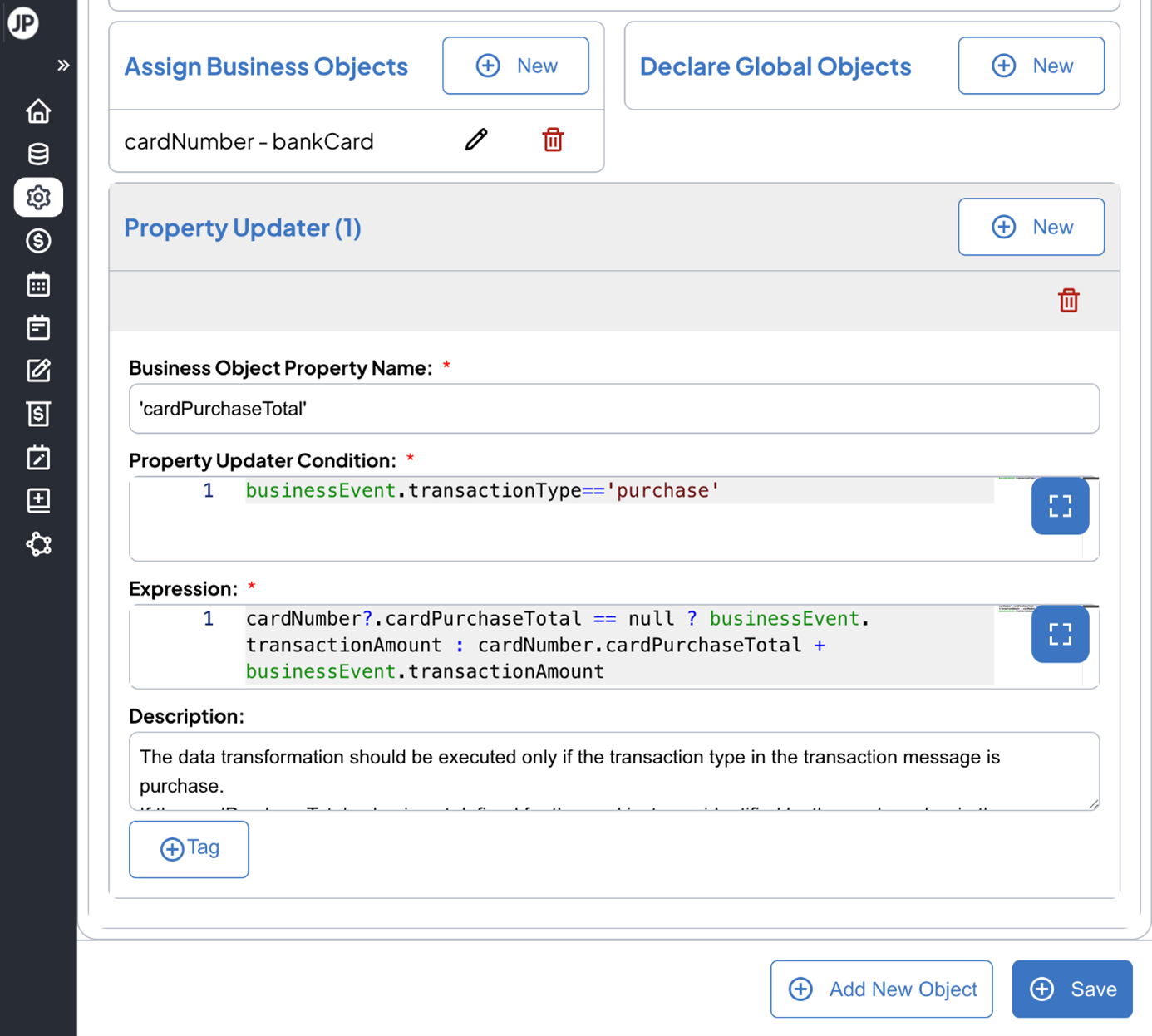
.png)
Our Pricing Engine uses a flexible data model, allowing you to use your own specific data conventions. Our data model has no presets or field names.
Within the Object Updater you can simply map your data through configuration settings instead of using developer resources to conduct extensive integration mapping.
There is no limit on the type or number of parameters you can associate with any business object, such as account or card.
This allows incredibly fast introduction of new pricing conditions as any information can be integrated from any system. By simply adding the data to the business object parameter, you can use it in new pricing formulas immediately, removing the time consuming addition of new parameters in existing core banking systems and other inflexible systems.
This enables a faster time to market, as well as providing an efficiency that creates the potential to test new pricing options without extensive resource commitment.
The Pricing Engine allows you to create complex condition formulas using logic familiar to you from Excel. Within the Pricing Templates, you have unlimited flexibility to combine multiple criteria and events in the same pricing formula, allowing you to create complex bundle pricing across multiple products combined with behavioural conditions.
This configuration also allows Business Analysts to create and launch new pricing formulas directly, without the need for IT resources.
Example: Setting the account maintenance fee to 0(free) if the pricing date is within 12 months of account opening date (new account promotion).
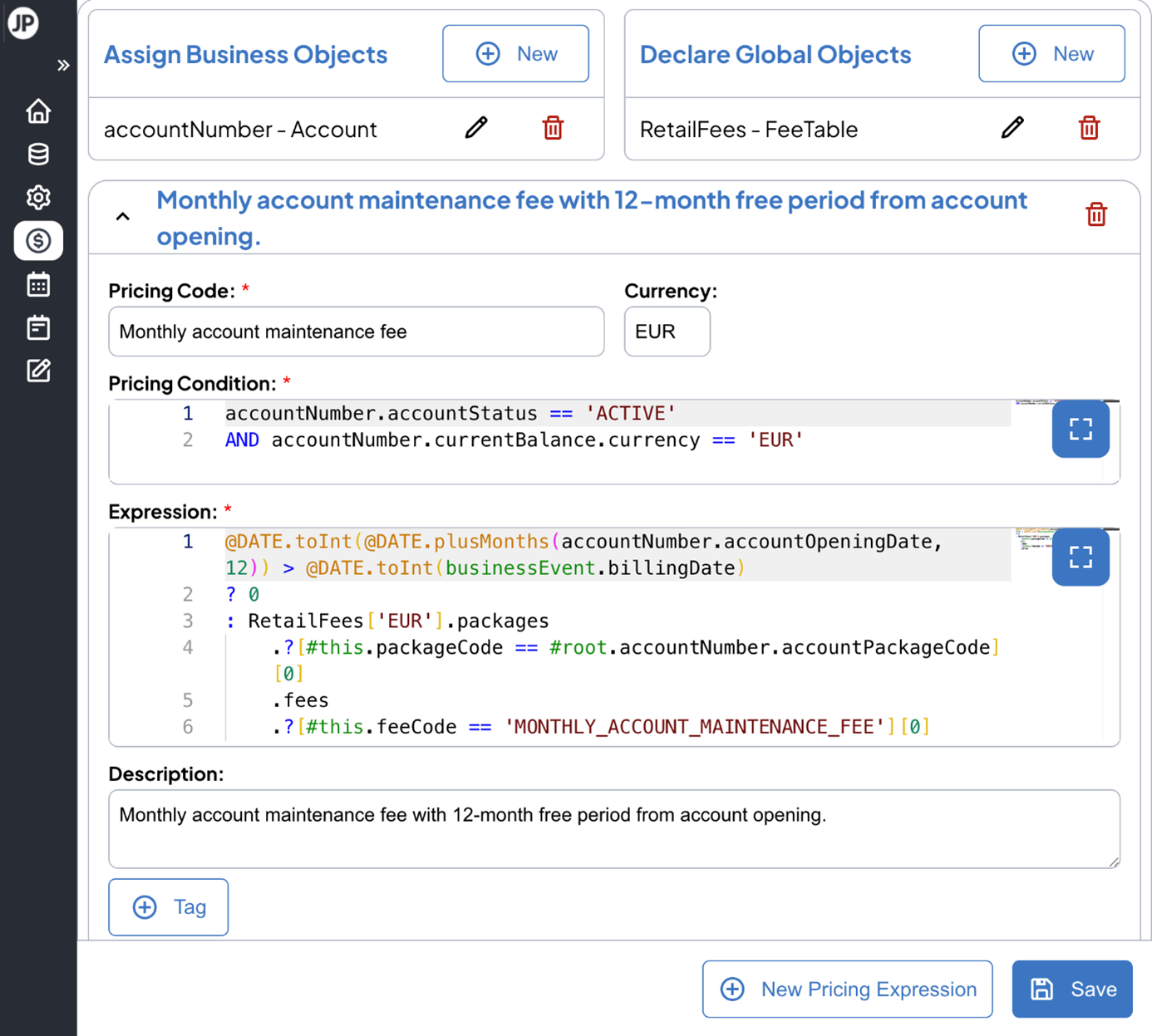
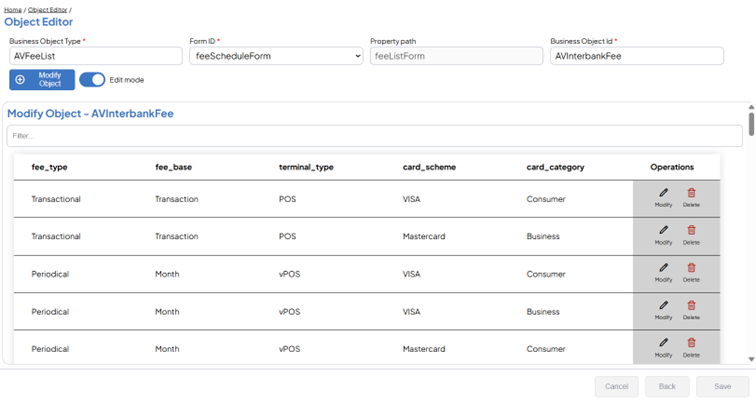
The Pricing Engine allows you to comfortably set and maintain multiple (for example local and global) pricing schemes in the Object Editor.
The ability to maintain multiple pricing schemes in parallel has proven particularly useful for financial institutions during post-merger integration or in transition to more centralized pricing.
In the Pricing Template, you can set the rules and conditions for pricing schemes to use with simple Excel-like formulas. The condition parameters you can use are unlimited, allowing for many different transition scenarios, whether you need to base pricing scheme choice on your internal organization parameters (such as which entity is managing the customer), or historical data (such as account creation date), or other CRM parameters.
Image: Object Editor with easy to maintain pricing schemes.
New products and channels require the ability to price new objects as well as trace and price customer behavior to provide a good return on investment. Nova’s Pricing Engine allows you to:
Nova’s Pricing Engine, thanks to its advanced parameterization, is capable of:
Let us show you exactly how the Pricing Engine can help you implement complex pricing without the need for complicated development, all while maintaining your current core system.


Head of Product Sales
